
Product Data Enrichment
From a product name to a store-ready listing
EnrixaAI turns a product name, a barcode or your own files into a finished, accurate listing: identified, sourced, written in your voice, checked and ready to export or publish.
14 languages
Pharmacy-grade QA
Publish to Shopify & WooCommerce
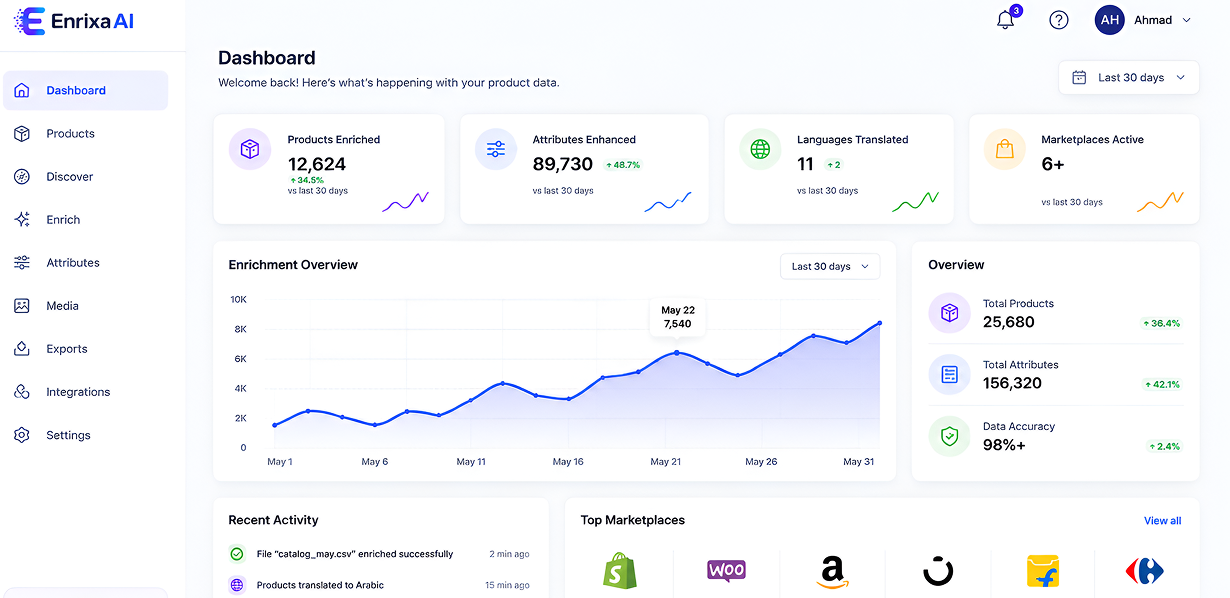
Trusted by 500+ brands and retailers worldwide






4
Ways to start: a name, your files, a PDF catalog or a CSV
14
Languages, including Arabic and US / UK English
13
Built-in schemas, from electronics to pharmacy
9
Export formats, plus direct publishing
How it works
4 ways in. 7 steps. 3 ways out.
Every product, whichever way it starts, runs through the same chain, so a listing built from a barcode is checked as carefully as one built from your files.
Start with
Discover
Enrich
PDF catalog import
Bulk build from CSV
The same 7 steps
- Identify the exact product
- Gather sources
- Extract the facts
- Merge and settle conflicts
- Write in your voice
- Collect and check images
- Run quality checks
Finish with
Review & edit
Export
Publish
Four ways to start
Whether you have data or not
Search the open web, build from your own material, or load a whole catalog at once.
Enrich
PDF catalog import
Bulk build from CSV
Discover
Type a product. Get a finished listing.
EnrixaAI finds the product on the web and writes the listing. It costs 2 credits, shown before you start and refunded if the build fails.

Type the product
A name, model or barcode (GTIN). Pick the schema, the site and the country.
Identity check
Brand, model, size and variant are read from what you typed. If it’s ambiguous, a card asks which product you mean.
Exact variant
“Which exact product is this?” offers the sizes, colours and packs found on the product pages.
Barcode verification
The check digit is validated, then Open Food Facts and Barcode Lookup are checked. Verified facts take priority.
Registry match
Built before? Reuse its verified facts with freshly written text for 1 credit, or build fresh from the web.
Web search
Runs in the background. Each page gets a product-page score and a match score against your product.
Source picker
You choose which pages to trust, and whether to trust their images. The best page per website is pre-ticked.
Build
Pages and PDF spec sheets are read, facts merged, content written, images checked and QA run, with live progress.
Enrich
Build from your own material
Upload what you have. No web search unless you ask for it, and the same 2 credits, product page and exports as Discover.
- Also enrich with web search to fill fields your files don’t cover, at no extra cost
- Brand and category hints, writing instructions, target country and export image size
- Smart merging: photos win over PDFs, which win over spreadsheets, and every field records where it came from

| What you upload | What happens |
|---|---|
| Product photos (JPG, PNG, WEBP) | AI vision reads the packaging and labels, with OCR as the fallback in the languages you set |
| PDF spec sheets and brochures | The text layer is read; scanned PDFs go through OCR |
| CSV, TSV and Excel (XLSX / XLS) | Columns are matched to schema fields |
| Text or Markdown files | Used as source text, or as your brand-voice guide |
| Your store’s product page URL | Read as the product’s own page |
| Up to 8 source page URLs | Brand sites, retailers and spec sheets; the brand’s own site wins, then marketplaces |
| Direct image URLs | Downloaded and checked by AI vision (CDN, supplier portal, public Google Drive) |
Bulk
Whole catalogs, built product by product
For supplier and B2B ranges that live in one dense PDF or one big spreadsheet.
PDF catalog import
Upload one catalog and EnrixaAI finds every product in it, then builds each one as its own listing.
- Reads every page, with OCR for scanned pages, and keeps page numbers
- Finds every product and joins products that run across pages, matched by SKU and title
- Builds each product from its own pages, and attaches the photos printed on them
- Augment with web search per product, recommended for well-known brands
250 MB catalog
500 pages
1,000 products
2 credits each
Bulk build from CSV
Each row becomes its own unattended Discover build. A template CSV is ready to download.
- Column mapping to schema fields or identity roles: name, model, barcode, brand, product URLs
- Held for review, not charged: rows with no clear matching source or an unclear variant wait for you instead of guessing
- Your values win: anything in the CSV overrides the AI-written value
- Fair queueing so a big upload never blocks other work, with retry and re-run for any row
500 rows
10 MB per file
8 URLs per row
2 credits per row
Mobile app
Create products from your phone
Take a few photos of a product, add a text or voice note in any language, and the EnrixaAI app writes the listing for you. Check it, make any changes, and send it straight to your store.
Voice notes in any language
Android and iPhone
Shopify
WooCommerce
Enrixa Store
Safe by design
Products are always sent to your store as a draft. Nothing goes live to customers until you approve it in your store.
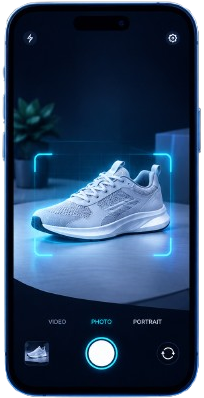
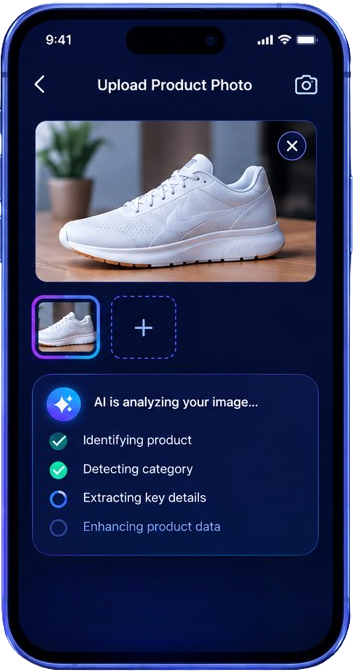
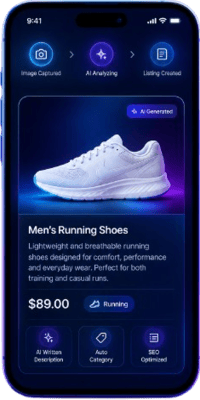
Camera and gallery
Take photos with guide lines to frame the product, or pick several from your gallery at once.
Text or voice notes, in any language
After taking photos, type a note or just speak one, in any language. Say what makes the product special, and the AI builds the listing around it.
Keeps working in the background
Live progress while the AI writes, and “Try again” if anything fails, without losing your photos.
Review and edit everything
Every detail on one screen. If your store needs a field the AI couldn’t find, the app asks before you publish.
One-tap publish, no duplicates
Sent as a draft. If a draft for the same product exists, the app updates it instead of making a copy.
Your store at a glance
Total products, published, needing review and credits left, plus your 10 latest products.
All your products
Filter by Building, Needs review or Published, with when each was last updated.
Light and dark mode
Matches your phone’s setting, or switch with one tap.
Secure and reliable
Sign-in kept in your phone’s secure storage, and uploads retry without duplicate photos if your connection drops.
Coming soon Sign up in the app, Google, Facebook and Apple sign-in, connect your store from your phone, notifications when a listing is ready, and an in-app help centre.
Identity and sources
The exact product, from the right pages
Getting the product right comes first, so a listing never mixes two variants or two brands. Then every page is scored and filtered before anything is copied.
Identity resolver
AI reads the brand, model, size, variant and category from what you typed, and asks when a required detail is missing.
Exact variant picker
Up to 3 product pages are checked for sizes, colours and packs, so a listing never mixes two variants.
Barcode (GTIN) verification
GS1 check-digit validation, then Open Food Facts and Barcode Lookup. Verified facts win over web text.
Brand conflict warnings
A critical warning only for a real clash, such as a different brand or model, not for resellers’ wording.
Page scoring
Every page gets a product-page score (is it a real product page?) and a match score (is it this product?).
Right page per site
Manufacturer product pages beat home and category pages; exact-model and spec pages stay ticked.
Hard pages handled
Bot-blocking pages are skipped, image galleries de-duplicated, and PDF spec sheets read.
Focused page text
Only the product’s own section is kept; menus, footers and other products are cut out.
Country-aware search
Five AI search engines look for your product as a buyer in your target country would.
After a build, four buttons add more
| Button | What it does | Credits |
|---|---|---|
| Find more sources | Targeted searches for the groups of fields still empty; new pages are added to the source picker. | 1, refunded if nothing new is found |
| Web augment | Pulls web data into empty fields, for example on a thin catalog product. | 2, refunded if no field is filled |
| Read from photos | AI vision reads fields printed on the pack: ingredients, storage, batch, manufacturer. | 1, refunded if no field is found |
| Fill missing | Rewrites only the empty fields from sources already gathered, with no new fetching. | 1 |
Extraction and writing
Facts from every source. Written in your voice.
Facts are pulled from each source separately, merged with conflicts settled, then written up for your schema.
Accurate facts
- Structured extraction: every page, PDF, photo and sheet is read into typed fields, never free prose
- Conflict arbiter: when sources disagree, the stronger one wins: verified barcode data, then the brand’s own site, then retailers
- Source of every field: uploaded image, PDF, CSV, AI or you
- Commercial fields stay yours: price, SKU, barcode and stock are never written by AI
Content that sells
- Full listing: description (200–300 words), short description, key features, specifications, FAQ and usage instructions
- Brand voice: your brand-voice guide is used as a style example, and your writing instructions are followed
- SEO on every schema: meta title (50–60 characters), meta description, keywords, primary keyword, category and subcategory
- 14 languages, set per site, and translate a finished product at no credit cost
- Clean-up: filler like “Not applicable” and empty spec rows are removed
Schemas
The right fields for every category
A schema decides which fields a product gets, so a pharmacy item and a TV each get the right ones.
Electronics
Apparel
Home & Kitchen
Beauty
Pharmacy & Healthcare
Healthcare
Medical Devices
Groceries & Packaged Food
Pet Food
Baby Care
Personal Care
MENA skincare & hair care
Generic
Your own schemas
Create, edit, clone, archive or delete schemas, and move a finished product to another schema.
Import and export
Load a schema from JSON or CSV, and download any schema as JSON or CSV.
Field rules
Required fields, field types, category lists, commercial fields only you fill, and core SEO fields on every schema.
Images
The right photos, checked by AI vision
Images are collected from every trusted source, filtered, checked, and can be resized, framed, upscaled or reshot.
Collection
From the pages you picked, verified barcode images, your own store’s matching images, PDF catalog pages, and your uploads or image links.
Filters and AI vision
Banners, menu tiles, logos and duplicates are dropped. AI vision keeps, rejects or ranks each image and picks the featured one.
Image tools
Resize, 4× upscale and Smart Frame for a clean, consistent look, exported at 800, 1200, 1500 or 2000 px square.
AI photoshoot
New shots from your own product photo. Only the background is generated; the product pixels stay yours, so labels, logos and colours never drift.
White background
Product cut out on pure white, 1500 px, with a soft shadow
Free
Studio backdrop
AI paints an empty studio set and your cut-out is placed in it
1 credit
Lifestyle scene
AI paints a real-life setting that suits the product
1 credit
Safe by design
- AI photos wait until you promote them, and never reach an export or Shopify before that
- On Amazon an AI scene is never the main image
- A label check guards every result, and failed shots are refunded
- Optional public hosting on S3, Cloudflare R2, Backblaze B2, Wasabi or MinIO, so Shopify can fetch your images
Quality checks
Pharmacy-grade QA on every build
Every build gets a QA report, and two gates stop a weak listing from going live.
Completeness
Short descriptions, missing FAQ, empty required fields, values outside the category list
Consistency
Fields that contradict each other on size, count or claims
Fact and grounding
Claims not backed by the sources, checked against today’s date
Uniqueness
Text copied from a source site, including bullet lists, so you avoid duplicate content
Compliance
Medical marketing claims on pharmacy products
Buyer review
An AI buyer reads every field and flags what’s missing or confusing
SEO audit
Primary keyword, title and description length, brand in the title
Image check
Wrong-product or off-topic images
Review and editing
One page to review, edit and finish
Every product lands on one page before you export or publish it.
Re-run anything
Re-run QA alone, re-run the clean-up passes, retry a failed build, or rebuild from scratch.
Editable fields
Every schema field, the SEO fields and the commercial fields, saved in place.
Images panel
Featured, gallery, candidates and AI photos, with the image tools beside each.
QA panel
The full report, grouped by severity, so you fix what matters first.
Live status and cost
Progress updates while it builds, plus the cost of every build, stage by stage.
Exports and publishing
One click to every major marketplace
A finished product exports to nine formats, or publishes straight to WooCommerce or Shopify.

Shopify
Publish via OAuth + CSV

WooCommerce
Publish via REST API

Amazon
Seller Central CSV

Noon
JSON export

Flipkart
Bulk listing CSV
Publish to Shopify
- Connect with Shopify in one click (OAuth)
- Field mapping: map each field to a Shopify column or any metafield, saved per schema per store
- Collections and updates: pick collections, or choose an existing product to update
- Connection test before every publish
Publish to WooCommerce
Creates the product with its images. Republishing updates the same product instead of creating a duplicate.
Or export
JSON
CSV
Shopify
Flipkart
Amazon
Noon / Carrefour MENA
HTML
PDF
Word
Cross-store product registry
Proven facts. Your own words.
Every successful publish adds the product’s verified facts to a shared registry, so the next store building the same product starts from proven data while still getting its own text.
Facts
Ingredients, allergens, nutrition, dimensions, regulatory text (indications, dosage, warnings), barcode and manufacturer. Keyed by barcode first, then brand and product name.
Text
Description, short description, key features, meta title and description, keywords, FAQ and usage are rewritten in each store’s voice and language, so two stores never publish duplicate content.
Customer stories
Success stories that speak
Feedback from teams using EnrixaAI to scale smarter and faster.
Driving real business growth
Our customers rely on EnrixaAI to simplify complex product data workflows and deliver accurate, marketplace-ready listings at scale. From multilingual enrichment to regulatory compliance and AI-powered validation.
— Mohamed Al RawahiEcommerce Manager, Asian Pharmacy Oman
AI that delivers results
EnrixaAI replaced what used to take our team weeks. We went from messy supplier sheets to live, marketplace-ready listings in days — with quality our buyers actually trust.
— Sara KhalilHead of Catalog, Levant Retail Group
Proof, not promises
The pharmacy-grade QA was the deciding factor. Compliance flags, claims checks, and bilingual content all in one workflow — we finally trust automation with regulated SKUs.
— Mohamed Al RawahiEcommerce Manager, Asian Pharmacy Oman
Credits
Pay per product. Refunded when it fails.
Credits are shown before every action, and refunded when it fails or finds nothing.
| Action | Credits |
|---|---|
| Discover or Enrich buildRefunded if the build fails | 2 |
| PDF catalog or CSV, per productRefunded for failed and held rows | 2 |
| Verified facts + fresh text from the registry | 1 |
| Web augmentRefunded if nothing is filled | 2 |
| Find more sources, Read from photosRefunded if nothing is found | 1 |
| Fill missing | 1 |
| AI photoshoot, studio or lifestyle shotWhite background is free | 1 each |
| Translate into another language | Free |
- Background jobs: builds, searches, catalogs and photoshoots run in the background with live status
- Restart recovery: builds interrupted by a restart are picked up again
- Private by default: each account sees only its own builds
- Secure: API keys are stored encrypted, and every fetched address is checked first
Frequently Asked Questions
Questions, answered
Can't find your answer? Talk to our team.
Talk to us →Just a product name, model or barcode for Discover. For Enrich, upload what you already have: photos, PDFs, spreadsheets or page links. You can also import a whole PDF catalog or a CSV of products.
Identity comes first. EnrixaAI reads the brand, model, size and variant, asks which exact variant you mean, and verifies barcodes against Open Food Facts and Barcode Lookup. Verified facts take priority over web text.
No. Price, SKU, barcode and stock are never written by AI. A SKU generator can fill a SKU with your site’s prefix if you want one.
Yes. Every listing is written in your brand’s voice, and a uniqueness check flags text copied from a source site. Shared registry data covers facts only; descriptions, features and SEO text are always rewritten for your store.
Yes. The EnrixaAI app for Android and iPhone lets you snap a few photos of a product, add a text or voice note in any language, have the AI write the listing from both, review it and send it to Shopify, WooCommerce or Enrixa Store as a draft.
Listings can be written in 14 languages, including US and UK English and Arabic, set per site. Translating a finished product into another language costs no credits.
Publish straight to Shopify or WooCommerce, or export to Amazon, Flipkart, Noon and Carrefour MENA, Shopify CSV, JSON, CSV, HTML, PDF or Word.
Credits are shown before every action and refunded automatically when a build fails or finds nothing. Builds interrupted by a restart are picked up again.
Build your first listing today
Type a product name or upload your files, and see a finished, checked listing in minutes.